

VS Code extension
Env Checker
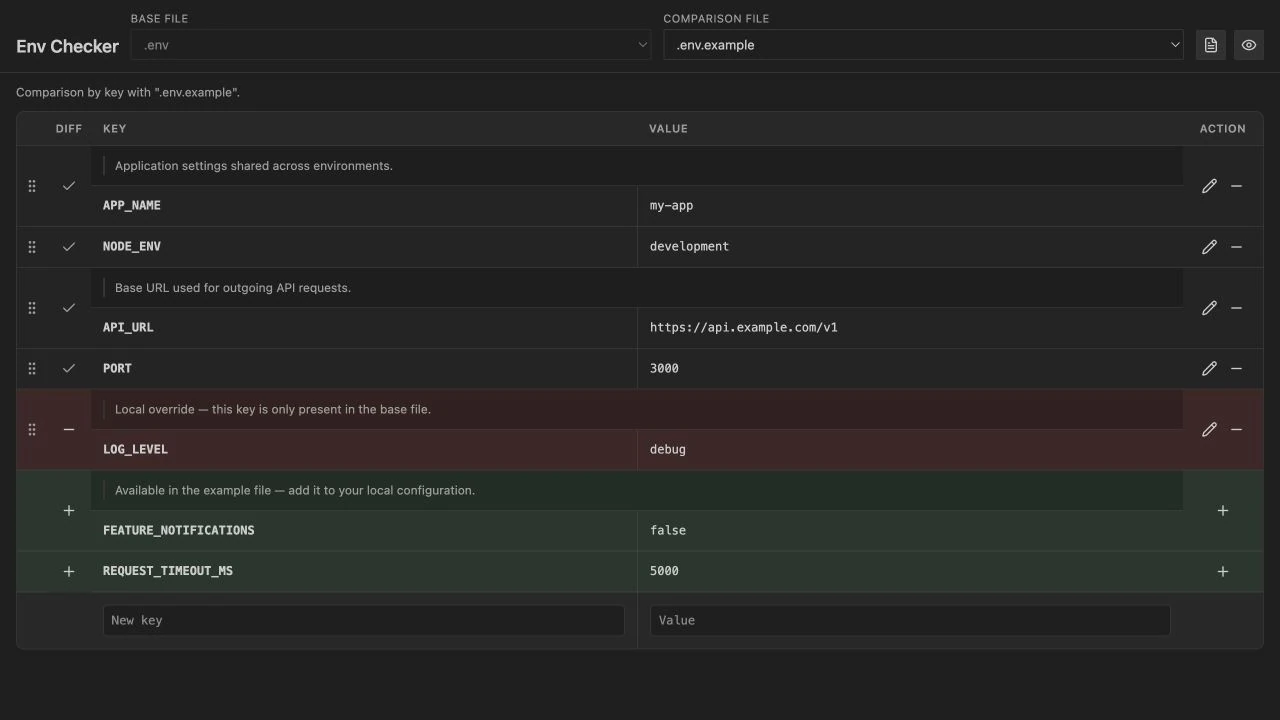
Open a .env file in a structured view. Comments become documentation next to each key, and comparing two variants shows what is missing or left over at a glance.
Install
code --install-extension CodeandSorcery.vscode-env-checkerOr search for “Env Checker” in the Extensions view of your editor.
- Status
- Live
- Licence
- MIT
- Platform
- VS Code 1.85.0 or newer

What it does
Custom editor
Opening .env or .env.* files uses the Env Checker view. One command takes you back to the plain text editor whenever you want.
Formatted table
Keys, values, and documentation merged from the # lines above each key plus the optional inline comment after the value.
Side-by-side comparison
Pick a base file and a comparison file from the same folder. When both exist, .env against .env.example is the default.
Live updates
Editing an env file in that folder refreshes the view, and unsaved buffer content is used when the file is open in a tab.
Dotenv language
A dotenv language id is registered for the usual filename patterns, so plain-text editing behaves properly too.
Commands
Also available from the Explorer context menu and the editor title bar when the file is an env file.
Env Checker: Open formatted viewOpens the comparison panel for the active env file.
Env Checker: Compare with .env.example (and related)The same panel, focused on your example and related files.
Env Checker: Compare env files…Choose files from a dialog; the first selection sets the folder context.
Env Checker: Reopen as text editorOpens the same file in the default text editor.
Settings
envChecker.relatedFileNamesBasenames in the same folder as the active file that count as related env files, in addition to the .env and .env.* patterns.
Parser notes
- An optional
exportbeforeKEY=valueis supported. - Comment lines immediately above a key attach to it as documentation; two or more consecutive blank lines break that link, one is still fine.
- Quoted values support escaping the way common dotenv implementations do.
Nothing leaves the editor
Env Checker reads the files you open and nothing else. There is no account, no telemetry and no network call, which is why it has no separate privacy policy. The source is MIT licensed and public.
